Live support on your website, in every language
Visitors write, call or start a video call in their own language. Your team reads and hears them in yours — Sponkly translates both ways, live. When nobody is there, an AI receptionist answers.
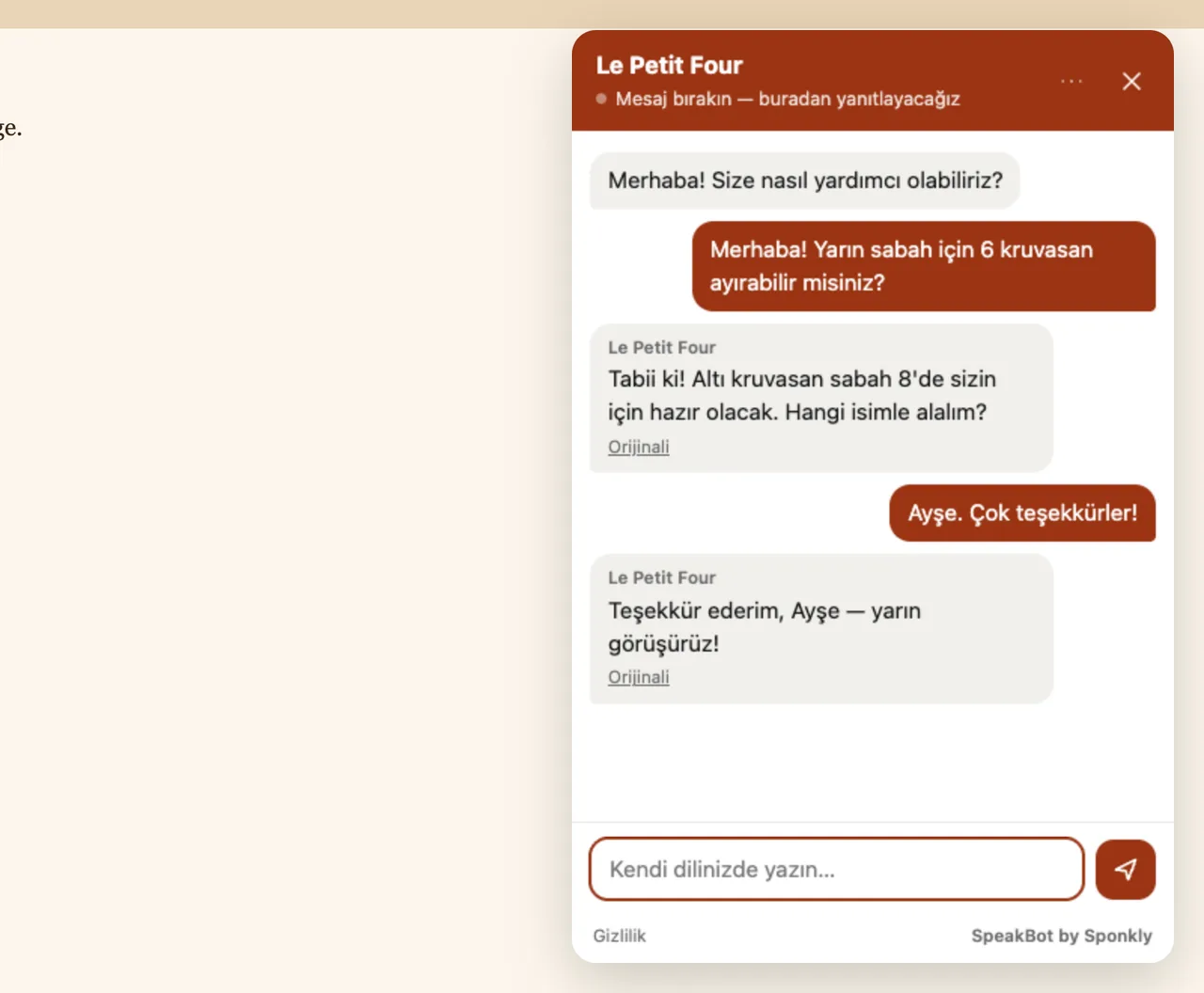
How a conversation goes
- 1
The visitor taps the bubble
No app and no account. The window opens in their language, with your greeting translated for them.
- 2
They write or call in their language
Turkish, Spanish, Japanese… They write a message or start a voice or video call, just as they would with a shop around the corner.
- 3
Your team answers in yours
You read and hear them in your language and reply the same way. Sponkly translates both directions in real time.
Your team answers in its own language
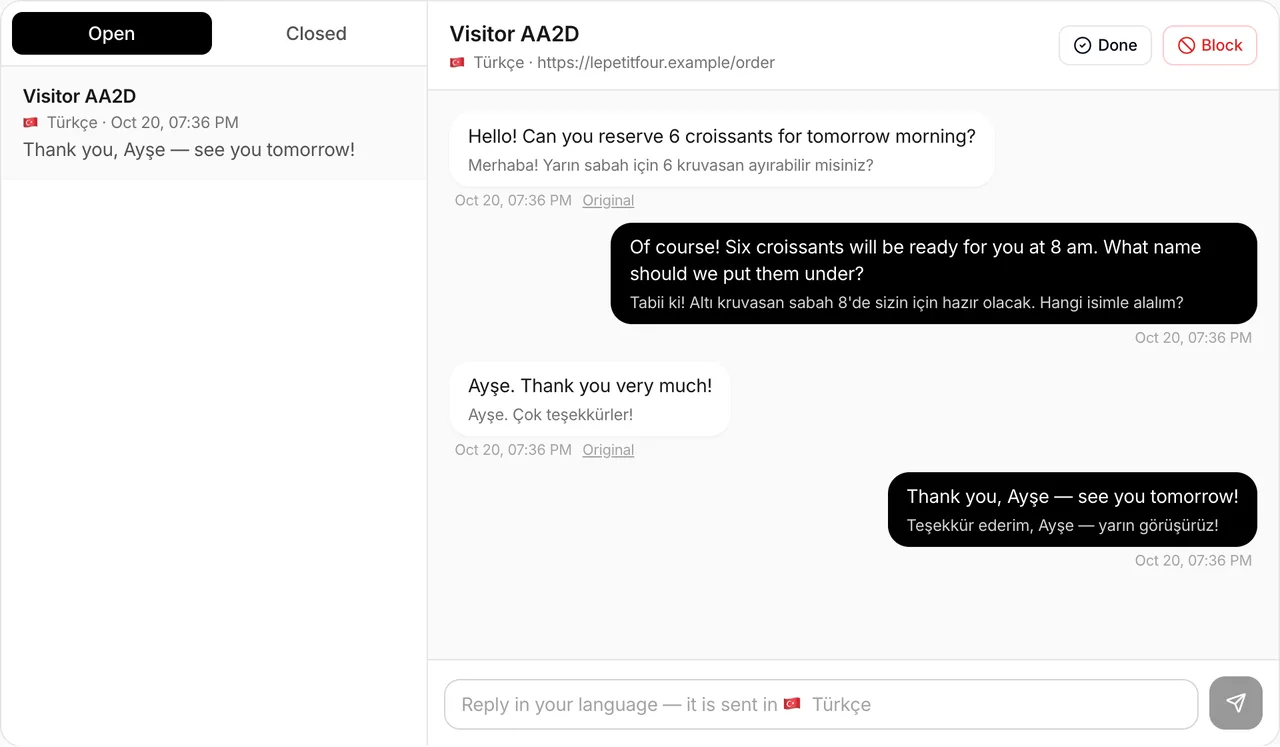
Every conversation lands in your Sponkly inbox, translated. You reply in your language; the visitor reads it in theirs. Calls ring the people of your team who are available.
- Messages translated both ways, the original one tap away
- Voice and video calls with live translated subtitles and a translated voice
- Close, block, and see which page the visitor wrote from
Voice and video calls, translated as you speak
A call starts from the website with one tap and rings the people of your team who are available. Each side speaks its own language: the other sees live subtitles and hears a translated voice.
- It rings only the people who are available; the first to answer takes it
- Live subtitles and a spoken translation, sentence by sentence
- Never recorded; a daily minute limit per website if you want one
María · 🇪🇸 Español
Do you deliver to Valencia before Friday?
¿Hacen envíos a Valencia antes del viernes?
An AI receptionist for the hours nobody is there
Write what a good receptionist should know: opening hours, prices, delivery, frequent questions. When nobody is available, it answers visitors by message or voice in their language, only from that information.
- It never makes up prices, hours or promises; when it does not know, it says a person will reply
- It steps back as soon as someone from your team answers
- Each answer counts as one translated message of your plan
What you write for it
Open Monday to Saturday, 7:00–19:00. Croissant 2.50 €, sourdough loaf 6 €. Orders for the next morning until 17:00.
One line on any website
Copy one line into your website — or use the WordPress plugin. It works with HTML, PHP, .NET, React, Next.js, Shopify, Wix, Squarespace, Webflow and Google Tag Manager. For React, Next.js, Vue and other JavaScript apps there is an npm package: sponkly-speakbot.
- Each website gets its own code and its own usage, all on one plan
- It opens only on the websites you verified
- Your colours, greeting, office hours and channels
<script src="https://sponkly.com/speakbot/widget.js"
        data-key="sb_…" async></script>
$ npm install sponkly-speakbotAll your websites, one plan
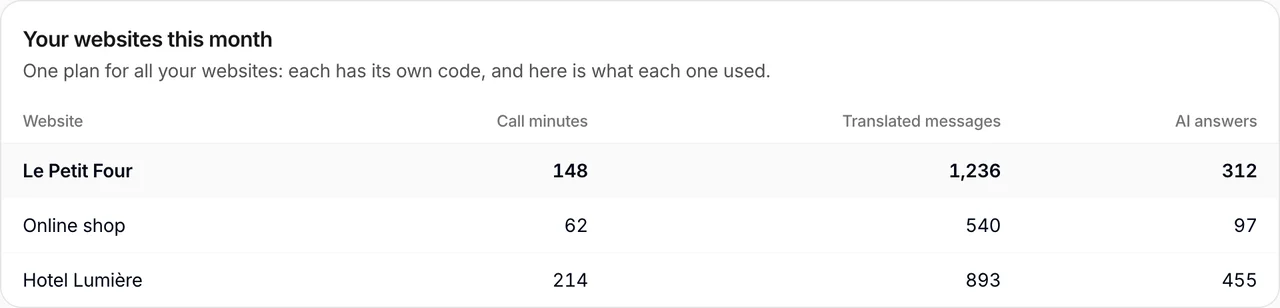
A shop, a hotel and a restaurant? Add each website with its own code. Every website has its own settings and inbox, and you see what each one used this month.
- Up to 10 websites on Business, 50 on Enterprise
- Call minutes, translated messages and AI answers for each website
- Invite your team: each person answers for the websites they belong to
Built against spam and abuse
Your site key is public — it is in your page's source code. So SpeakBot treats every visitor as a possible robot and checks every request.
Only your websites
You prove each website is yours with a meta tag or a DNS record. On any other website the browser itself refuses to show SpeakBot.
A robot check without puzzles for people
Each visitor's browser solves a small proof-of-work in the background: unnoticeable for a person, expensive for robots that open thousands of chats.
Limits everywhere
Per visitor and per address: sessions, messages, calls a day and AI answers. The same text twice, or a recording pushed into a call, is refused.
Automatic bans, one-tap blocking
Addresses that keep failing the checks are banned for a while automatically, and you can block any visitor from the inbox.
Keys you control
Make a new site key at any time; the old one stops working at once.
Private by design
No cookies, no tracking across websites, calls never recorded. Your team sees who wrote (name, email, phone) and how they came (IP address, approximate location, device), and conversations are deleted after the time you choose.
Everything a visitor needs to reach you
Translated chat
Visitors write in any language; your team reads it in its own and answers there.
Voice calls
One tap on the website, no app and no account: each side speaks and hears its own language.
Video calls
Show a product, a room or a document face to face, with live translated subtitles.
AI receptionist
When nobody is available it answers by message or voice in the visitor's language, only from the information you give it, and hands over to your team.
Spam stays out
Only your verified websites, a robot check in the background, limits per visitor and one-tap blocking.
All your websites
One plan for up to 10 websites (50 on Enterprise), each with its own code, inbox and usage.
Included in Business and Enterprise
No extra subscription: SpeakBot uses what your plan already includes, and you decide how much each website may use.
- Calls use your plan's translation minutes
- Translated messages and AI answers use your plan's translated messages
- Set a daily minute limit for each website, or let Sponkly keep it to a quarter of what is left this month
- See plans
| Plan | SpeakBot | Translation minutes a month | Translated messages a month |
|---|---|---|---|
| Loading plans… | |||
The same plans as on the Pricing page.
Questions
How do I put it on my website?
Create a site in your Sponkly dashboard, add your website's address and prove it is yours (a meta tag or a DNS record), then paste one line before </body> — or install the WordPress plugin.
Do visitors need an app or an account?
No. They use the window on your website, in any modern browser on a phone or a computer. A voice or video call only asks for the microphone (and the camera).
Which languages?
Messages are translated between all the languages Sponkly supports. Calls use live speech recognition, which covers the major languages; if a visitor's language is not covered, they can still write.
What does it cost?
SpeakBot is included in the Business and Enterprise plans. Calls use the plan's translation minutes; translated messages and AI answers use its translated messages. You can set a daily limit for each website.
What if nobody is available?
Visitors can leave a message and you answer when you are back. If you turn on the AI receptionist, it answers right away from your information, by text or voice.
Can several people answer?
Yes. Invite people with a Sponkly account to a website: calls ring everyone who is available and the first to answer takes the call. Each person can switch to Away.
Does it work on phones?
Yes. On a phone the window opens full screen and calls work in mobile browsers. Your team answers from the Sponkly dashboard in any browser.
Can I open it from my own button?
Yes: call SpeakBot.open() from any button or link on your page, or use the sponkly-speakbot npm package for React and Next.js.
How is spam stopped?
The widget opens only on your verified websites. Every visitor solves a small puzzle in the background, there are limits per visitor and address, repeated abuse is banned automatically, and you can block anyone in one tap.
What about privacy?
No cookies and no tracking across websites. Before writing or calling, visitors give their name, email and phone; your team also sees their IP address, approximate location, device, browser and languages, to answer them. Calls are never recorded, conversations are deleted after the time you choose, and visitors can delete their conversation themselves.
Included in the Business and Enterprise plans.