




Chat, call and meet in any language
Sponkly translates your messages, your voice and video calls and your video meetings into 32 languages. Chats are end-to-end encrypted, and so are the audio and video of calls.
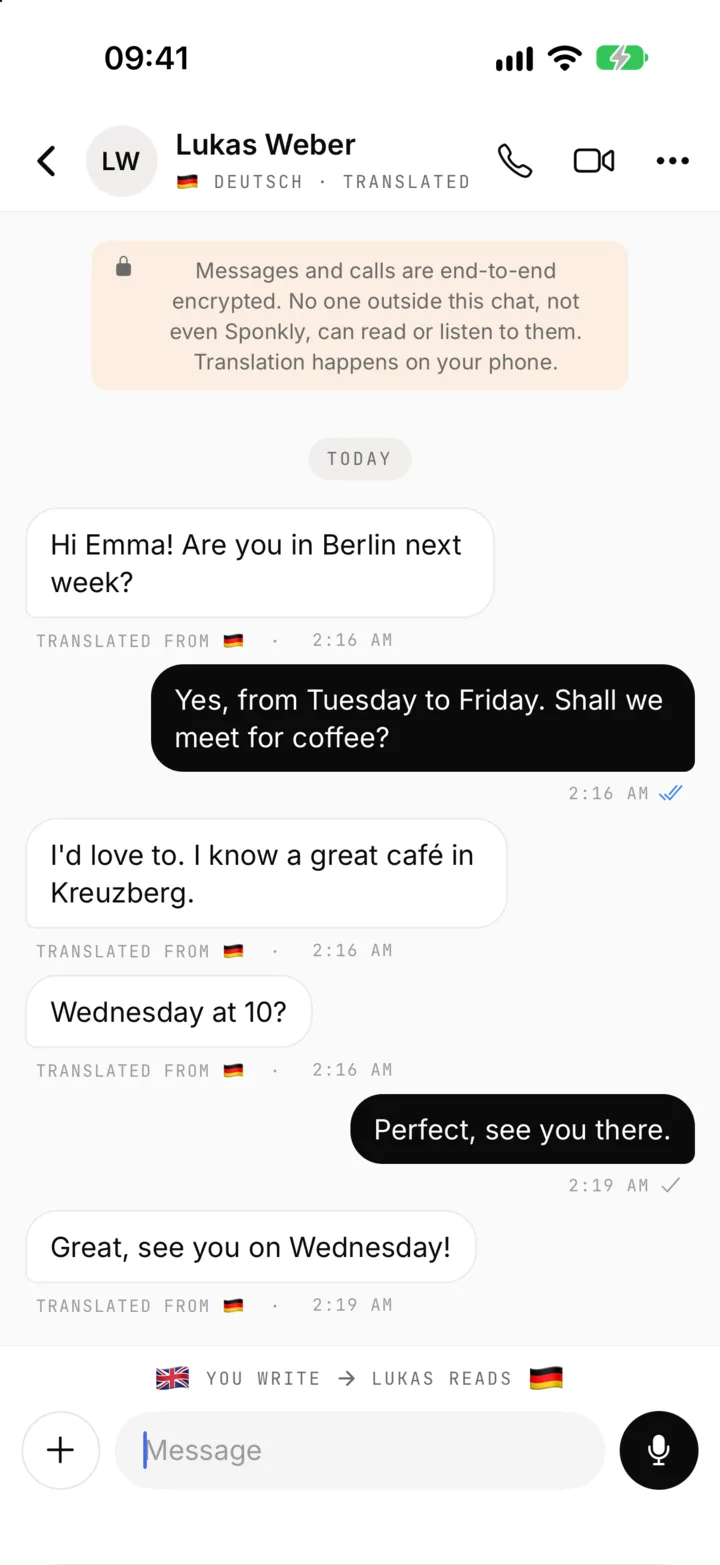
Translated chats
Write in your language; everyone reads in theirs. Photos, videos, documents, places, voice messages and group chats, translated on your phone and end-to-end encrypted.
Learn more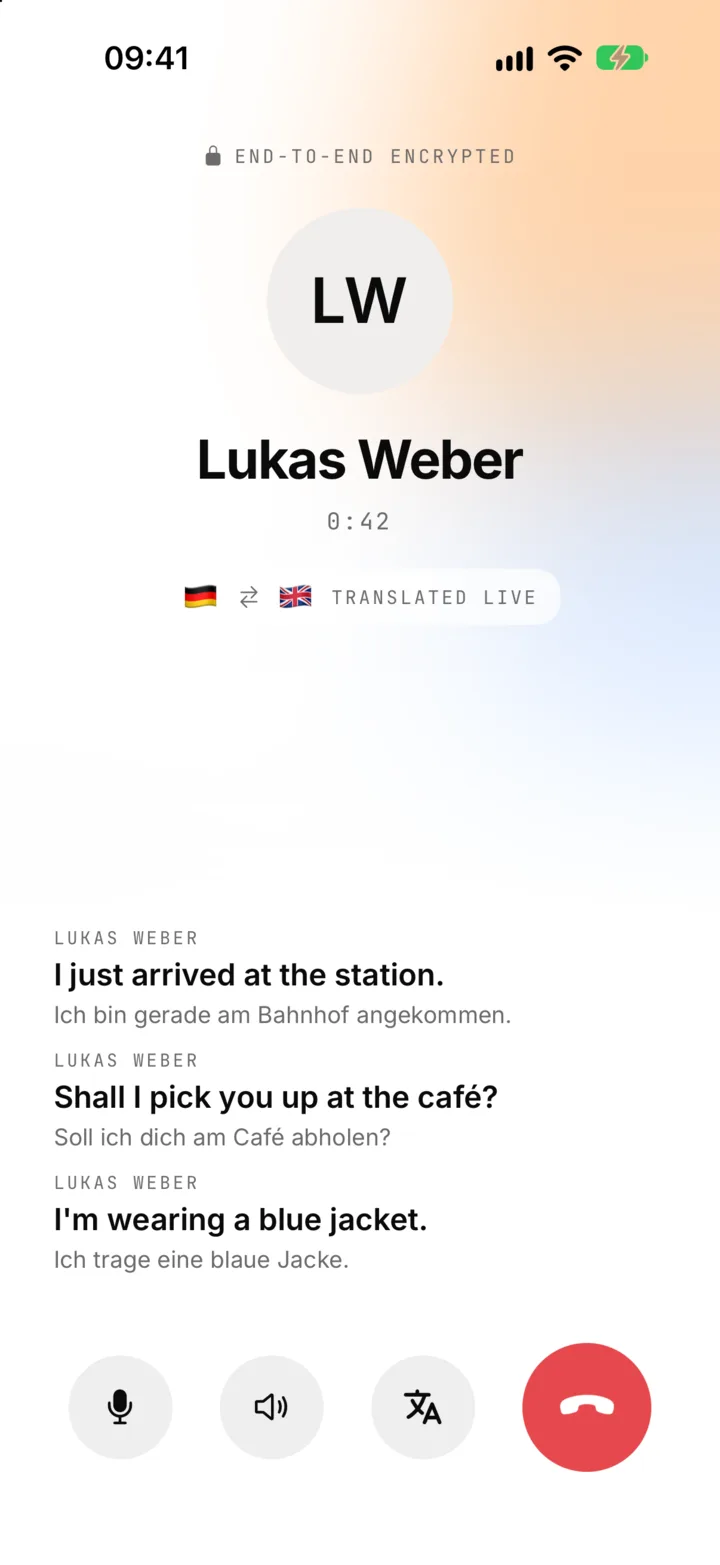
Voice & video calls
Talk with live subtitles and a spoken translation in a natural voice. Audio and video are encrypted between the phones; when translation is on, Sponkly translates what you say and keeps none of it. Unlimited calls on every plan.
Learn more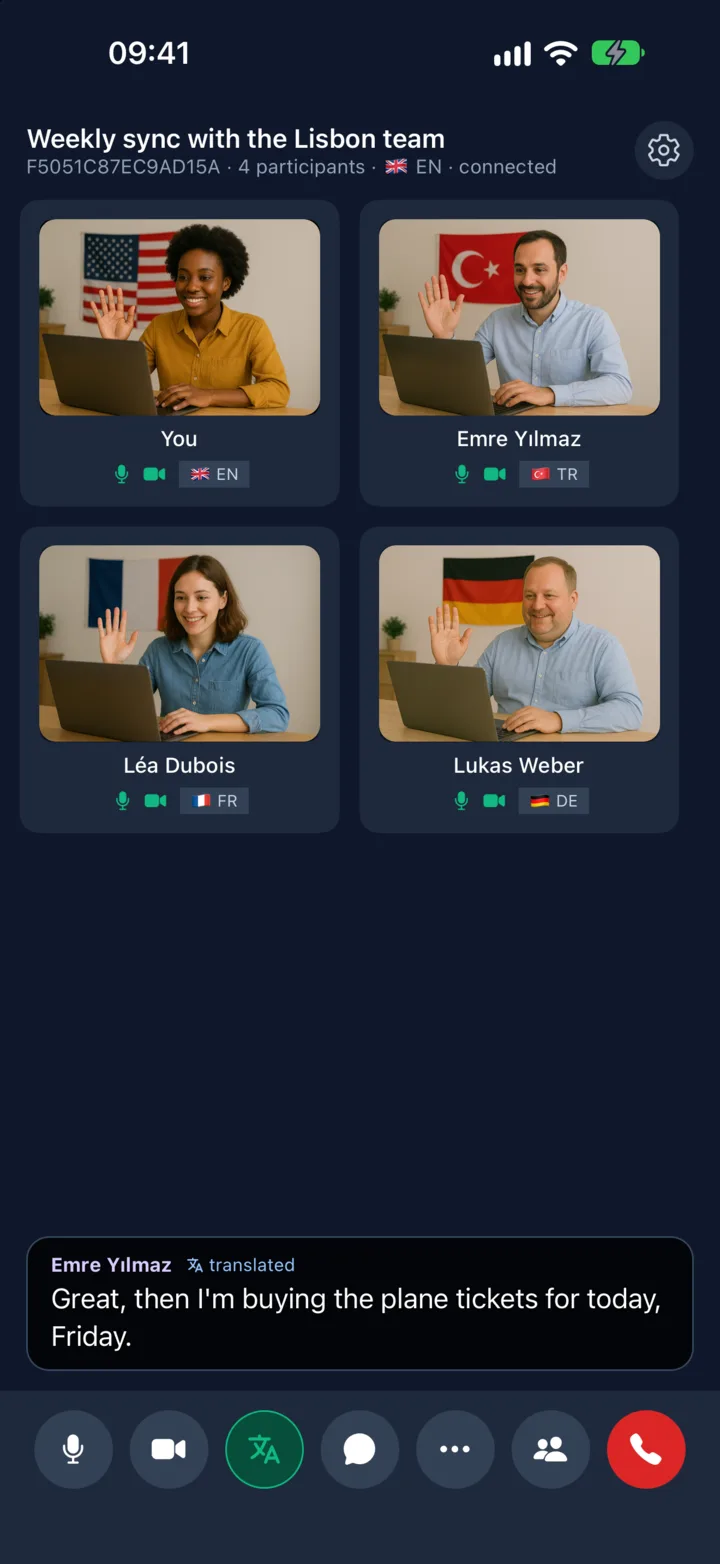
Video meetings
Meetings for up to 8 people where everyone hears the others in their own language, with subtitles, chat, polls and transcripts. Join from the app or any browser.
Learn moreOnly in the Sponkly app
Two more ways to cross languages, on iPhone and Android.
Video Studio
Record a video or choose one from your phone and get it back in another language: subtitles in both languages and, where dubbing is offered, a translated voice that sounds like you.
Only in the appLearn more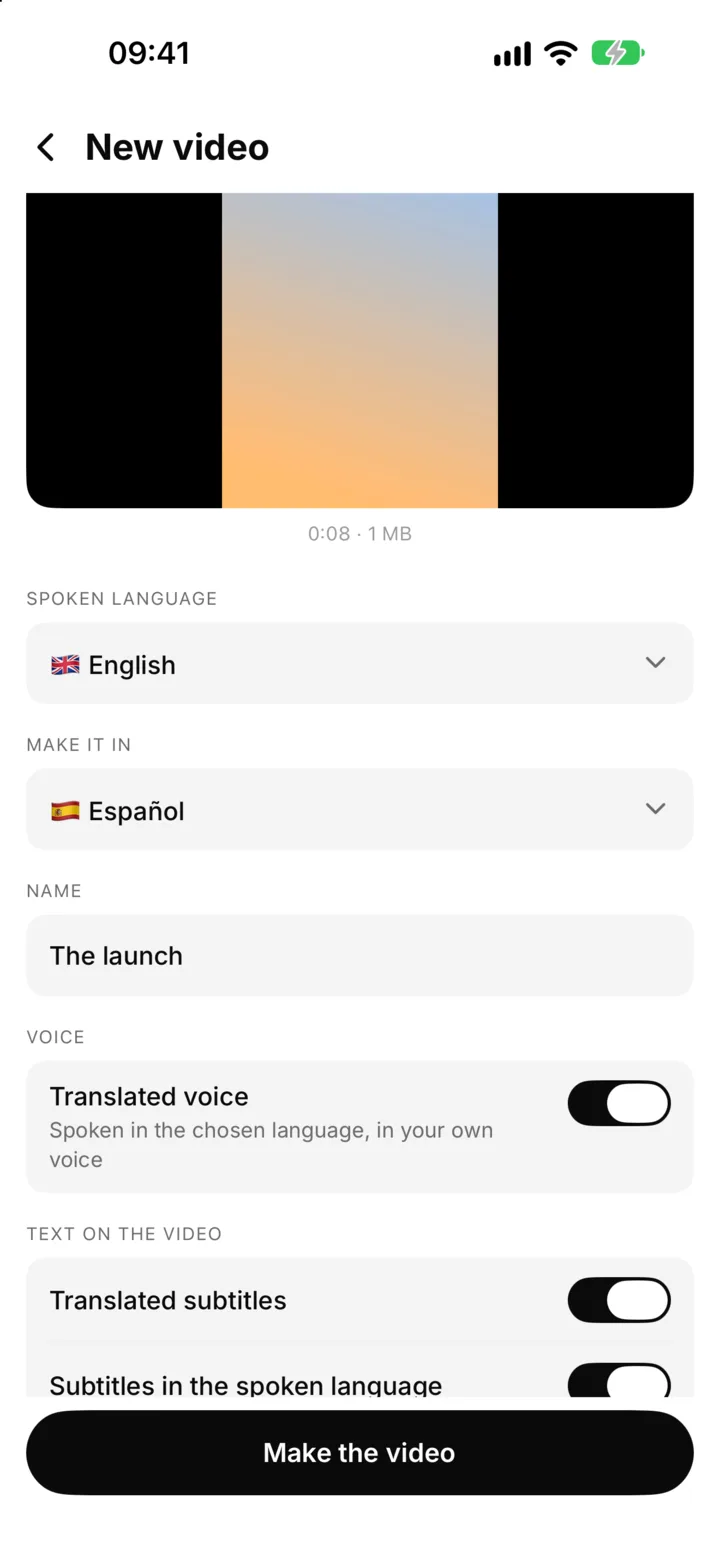
Face to Face
Put one phone between you and talk, each in your own language. Sponkly hears who is speaking, translates every sentence and reads it aloud to the other side.
Only in the appLearn more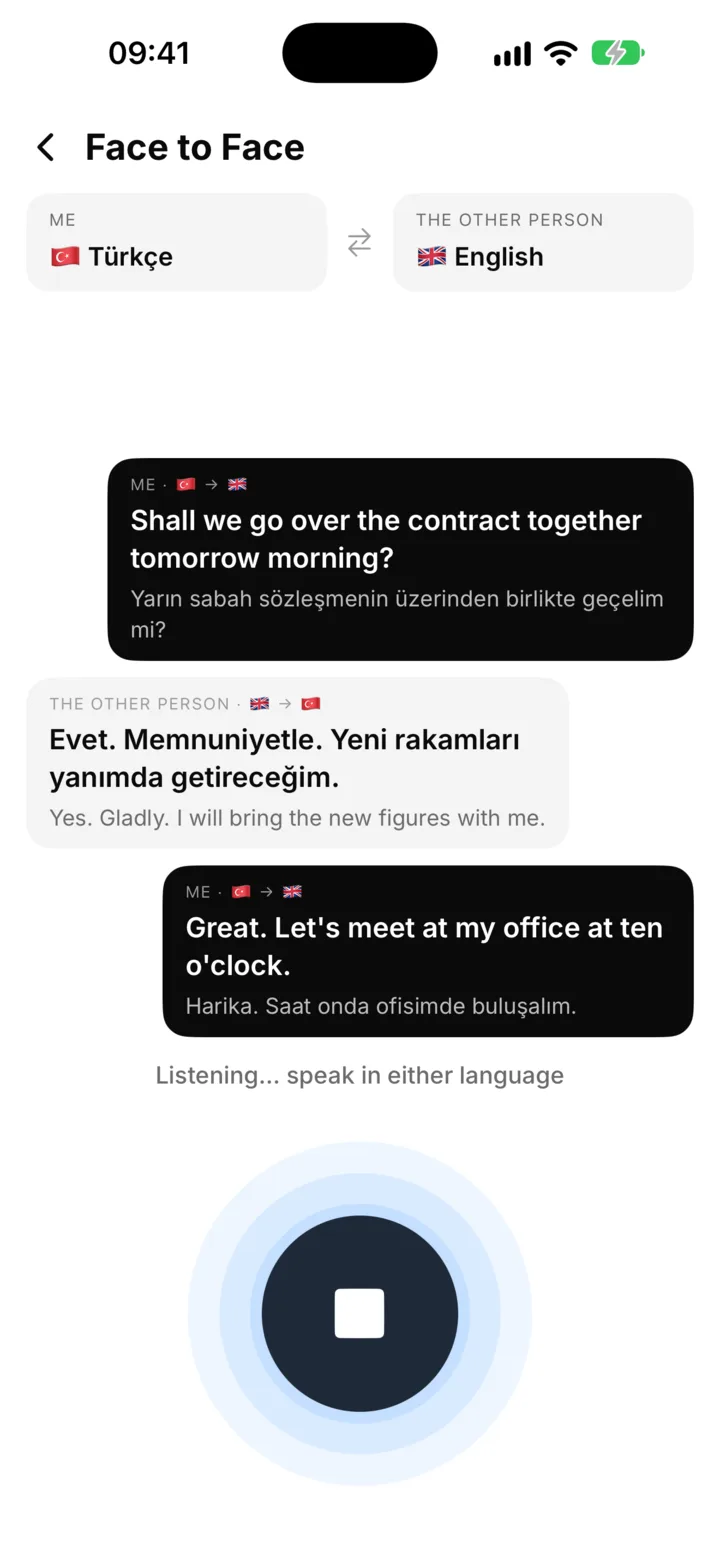
Video Studio and Face to Face are in the iPhone and Android app, not on the website.
Record a lecture, read it in your language
In a lecture in French, at a trade fair in Japan or in a meeting with partners abroad: press Record and read every sentence in your language as it is said. Afterwards you keep a clean transcript, a summary and the audio.
- Live transcript with the translation under each line
- Who spoke, misheard words corrected, summary in both languages
- Share as PDF, Word, TXT, subtitles, audio or a link
- In the app and on the website
Economics lecture, week 3
RecordingListening and recording…
12:48
12:24Aujourd’hui, nous voyons pourquoi la croissance a ralenti en Europe cette année.
Today we look at why growth slowed in Europe this year.
12:31La première raison, c’est le prix de l’énergie.
The first reason is the price of energy.
Et la deuxième…
Google Meet, Teams and Zoom — in your language
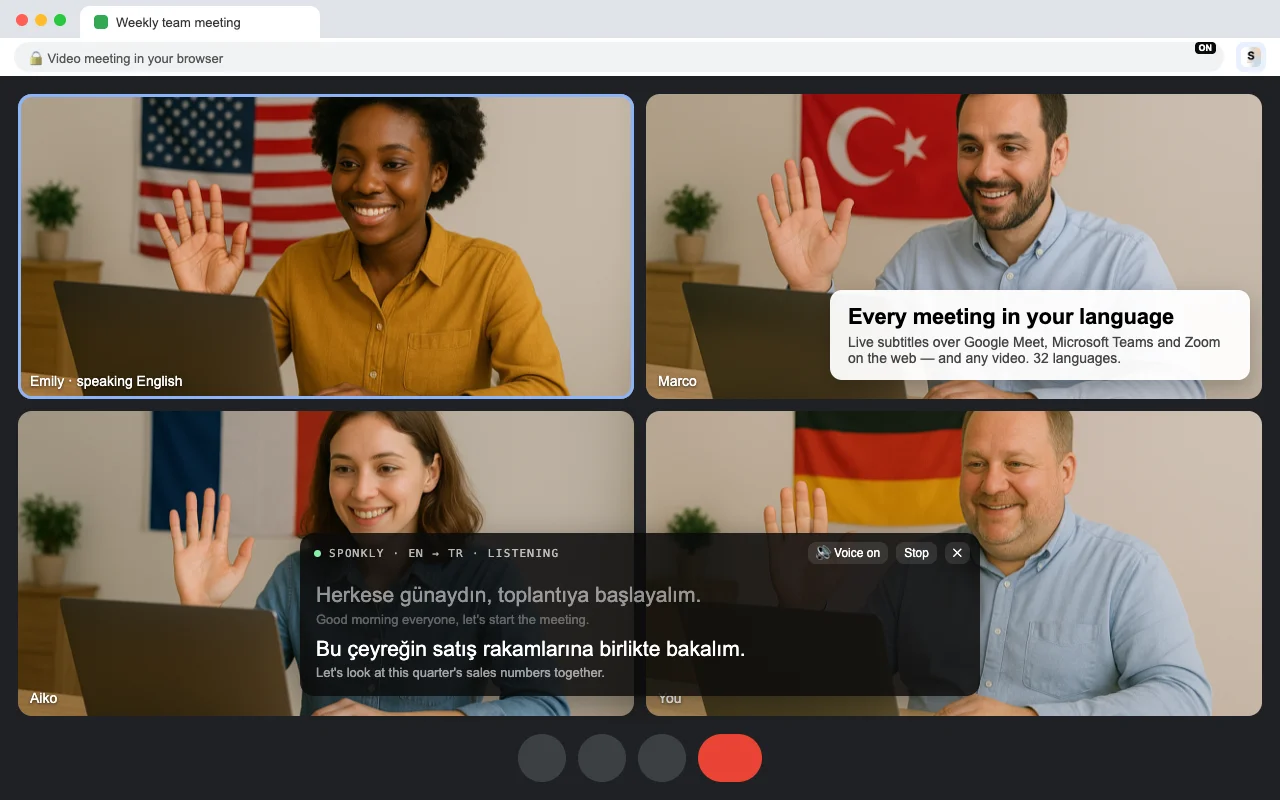
Join meetings as you always do. Sponkly shows live subtitles in your language over the call, can read the translation aloud, and lets the others hear you in their language. Nobody else has to install anything.
- Google Meet, Microsoft Teams and Zoom in the browser
- Any video too: YouTube, webinars and online classes
- 32 languages, translated both ways
Watch YouTube in your language
A lecture in English, a recipe in Korean, the news in Arabic: Sponkly listens to the video as it plays and shows it in your language.
- Live subtitles over the video, in 32 languages
- A natural voice reads it aloud if you want
- Nothing downloaded, no link to paste
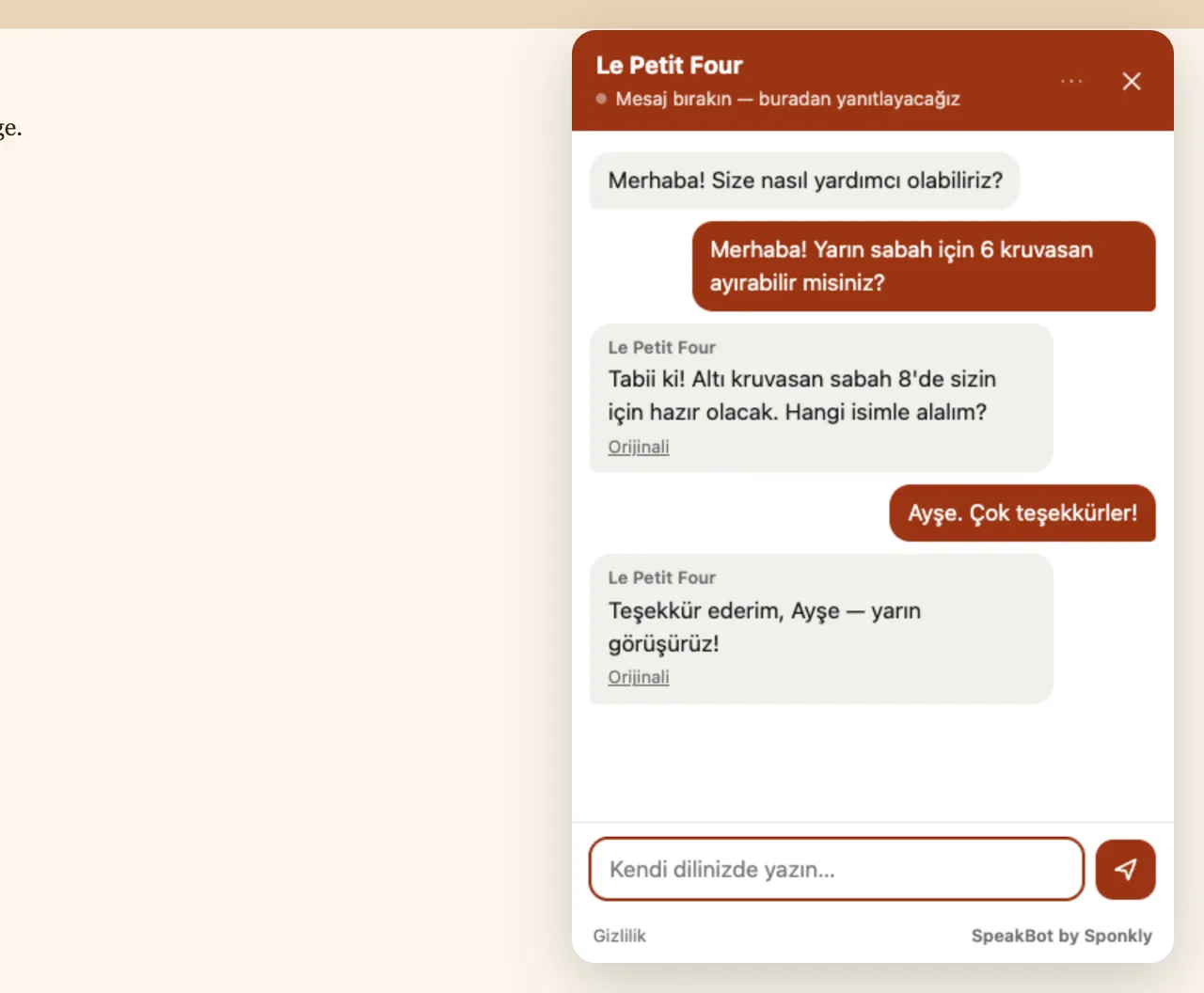
Talk to every visitor of your website in their language
Add one line to your website. Visitors write, call or video call you in their own language; your team answers in yours, translated live — and an AI receptionist answers when nobody is there.
- Chat, voice and video calls, translated both ways
- Works on any website: WordPress, Shopify, Wix, React, PHP…
- An AI receptionist that answers only from your own information
- Several websites on one plan, each with its own usage
Sponkly in your AI assistant
Claude, ChatGPT, Cursor and VS Code can now use Sponkly: translate text, see who wrote to your website and answer them in their language.
- Translate text between 32 languages
- Read your SpeakBot conversations in your language
- Answer visitors — they receive it in theirs
More than a translator
The things that make Sponkly a place for every conversation, in any language.
Private by design
Chats are end-to-end encrypted, and so are the audio and video of calls. Back up your chats with a passphrase only you know, lock the app with your face or fingerprint, and protect your account with two-factor sign-in.
- End-to-end encryption
- 60-digit security code
- Encrypted backup
- Face ID, fingerprint or PIN lock
- Two-factor sign-in
Video Studio, for creators and businesses
Turn a video of up to 60 minutes into another language, with subtitles and, where dubbing is offered, your own voice. Reach new audiences on YouTube, TikTok or Instagram, or present your products and offers to customers abroad.
Learn moreFace to Face
One phone between you, each speaking your own language. Whoever talks is translated and read aloud.
Face to Face without internet
Download a language once, then talk on a plane or abroad without a connection.
Nearby, over Bluetooth
Chat with Sponkly users around you with no internet, each reading in their own language.
Voice messages in your language
Read what was said, translated, or tap Play in your language to hear it.
View once
A message, photo or video that opens one time and then disappears.
Live location
Share where you are as you move, for 15 minutes, 1 hour or 8 hours.
GIFs, stickers and big emoji
Search GIPHY in any word, and send emoji that fill the screen.
Up to 4 linked devices
Your chats and calls in a browser, on an iPad, a Mac or another phone.
Everything in Sponkly
Every feature of the apps and the website, in one place.
Translated chats
Messages in your language
Everyone writes in their own language and reads in theirs. Tap a message to see the original.
Voice messages in your language
Up to 5 minutes. Written out and translated for the reader; Play in your language reads it aloud for them.
Photos and videos
From the camera or your library, with captions; videos up to 60 minutes and 64 MB.
GIFs, stickers and emoji
Search GIPHY for GIFs and stickers. A message of only emoji is shown big.
Documents up to 64 MB
PDFs, Office files and more, end-to-end encrypted like every message. Programs and scripts are blocked.
View once
A message, photo or video that opens one time, then disappears. You see when it was opened; unopened ones go after 14 days.
Share where you are
Send your current location; the other person opens it in their maps app.
Live location
Share your position as you move, for 15 minutes, 1 hour or 8 hours, end-to-end encrypted.
Groups of up to 100 people
Each member reads in their own language. Admins add and remove people, rename the group and change its photo.
Replies, reactions and delete for everyone
Answer a specific message, react with an emoji, or remove a message for everyone within 48 hours.
Typing and read ticks
See when someone is typing and when everyone has read a message.
Find friends from your contacts
See who already uses Sponkly; phone numbers are compared, never stored. Invite the rest by WhatsApp, SMS, Telegram or another app.
Room for files
Chat file storage by plan: 100 MB in the free trial, up to 100 GB on Enterprise.
Translated calls
Live translation
Subtitles and a spoken translation about 1–2 seconds after each sentence.
Voice and video, up to 8 people
One-to-one or group calls: 3 people on Starter, 5 on Professional, 8 on Business and Enterprise. Up to 4 hours.
A voice like yours
The translation is read aloud in the voice you chose in your profile: female or male, and an age range.
Hear the original
Switch to the speaker's own voice at any time.
All the usual buttons
Mute, speaker, camera and flip camera, plus live subtitles.
Rings like a phone call
Calls ring on the lock screen: with CallKit on iPhone, full screen on Android.
Call history
Missed, declined and answered calls in the Calls tab, with call back in a tap.
Unlimited calls
Calls are free on every plan. Translation uses the caller's minutes; calls in the same language use none.
Video meetings
Everyone speaks their own language
Up to 8 people, each hearing the others in their language with subtitles and a natural voice.
Minutes without a minute-taker
Every sentence is written down in the language it was spoken and as each participant heard it. Download it as Word or TXT: nobody needs to take notes or translate them. Business and Enterprise; kept for 30 days.
Screen sharing
Show slides, documents or a website from your browser.
Chat and files in the meeting
Messages are translated for everyone; send documents and images up to 50 MB.
Polls, raised hands and reactions
Ask a quick question, take turns and react without interrupting.
Password and waiting room
Every meeting has a password, carried in the invite link; with the waiting room on, you decide who comes in.
The host decides
Remove a participant from the meeting, or end it for everyone.
Schedule and invite
Start now or plan ahead; invite up to 20 people by email, who get a reminder 15 minutes before.
App or browser
Join from the iPhone or Android app, or from any browser without installing anything, with a free Sponkly account.
Move to another device
Join the same meeting on another device and the first one leaves, so you carry on where you are.
Security and privacy
End-to-end encrypted chats
Only the people in the chat can read it, not Sponkly.
Security code
Compare a 60-digit code to be sure no one sits between you.
Encrypted chat backup
Back up chats to iCloud Drive or a folder such as Google Drive, locked with a passphrase only you know.
App lock
Open Sponkly with Face ID, Touch ID, a fingerprint or your phone's PIN, pattern or passcode.
Two-factor sign-in
A code from an authenticator app on top of your password, with backup codes.
Private notifications
Notifications show who wrote and the kind of message, never what it says.
Your devices
See where you are signed in and sign out everywhere at once. Linked devices are listed separately.
Block and report
Stop someone from messaging or calling you, and report abuse to our moderators.
Calls not stored
Call audio and video travel encrypted; the translation of what you say is not stored.
Safe payments
Cards are handled by Stripe, the App Store or Google Play; we never see your card number.
Record
Live transcript
Every sentence appears as it is said, with its translation under it.
Detect automatically
For talks in more than one language, or questions from the audience.
Who spoke
After you finish, the clean transcript shows each speaker.
Corrected from context
Words misheard on the way are fixed from what was said around them.
Summary and key points
In your language and in the language that was spoken.
Play, jump, search
Tap a line to hear that moment again, or search the whole text.
PDF, Word, TXT, SRT, audio
Side by side, one after the other, or one language only.
Share by link
Anyone with the link can read and listen, no account needed.
Only in the app
Face to Face
One phone between you: whoever speaks is translated and read aloud for the other.
Several speakers
A few people can take turns; each sentence is translated for the other side.
A voice that fits
The translation is read in a man's or a woman's voice, following the speaker.
Face to Face without internet
Download a language once, then talk on a plane or abroad with no connection.
Nearby
Chat with Sponkly users around you over Bluetooth, with no internet.
Video Studio
Record or choose a video, up to 60 minutes in 4K, and get it in another language.
For creators and businesses
Publish your videos for audiences in other languages, or present products and offers to customers abroad.
Subtitles your way
Translated, original or both on the picture, or none.
Dubbed in your voice
Where dubbing is offered, your speech in the new language, in your own voice.
Yours to keep
Save to your device or the cloud; Sponkly removes finished videos after 7 days.
On every device
iPhone and Android
Apps with notifications and calls that ring on the lock screen.
Linked devices
Your chats and calls on up to 4 more devices: browsers, another phone, an iPad or a Mac.
Calls in the browser
Make and answer translated calls in a browser linked to your phone.
Notifications
Push notifications on your phone and browser notifications on your computer, without the message content.
The whole app in 32 languages
Menus, messages from Sponkly and notifications in your language too.
How each one works
| Feature | Translated chats | Voice & video calls | Video meetings |
|---|---|---|---|
| Translation | On your phone | On Sponkly's servers | On Sponkly's servers |
| Encryption | End-to-end | Audio and video end-to-end | In transit |
| People | Up to 100 in a group | Up to 8 | Up to 8 |
| Where | App, and up to 4 linked devices (browsers, another phone, iPad or Mac) | App, and up to 4 linked devices (browsers, another phone, iPad or Mac) | App and any browser |
| What it uses | Translated messages a month | Translation minutes (same-language calls are free) | Translation minutes |
Private by design
Chats use the Signal-style X3DH key agreement and Double Ratchet: Sponkly relays encrypted messages it cannot read, and you can compare a 60-digit security code to be sure no one is in between. Call audio and video are encrypted end to end between the phones; when a call is translated, Sponkly's servers translate what is said and keep none of it. Meetings are encrypted in transit and translated by Sponkly's servers, so web participants can join.